HubSpot integration for manager preparation
Bring HubSpot customer context into your next one-on-one
Customer-facing work already lives in HubSpot, but a CRM record does not explain what support a direct report needs. ModoPersona lets a manager link the right HubSpot user to the right person and review relevant assigned deals and tasks while preparing for a one-on-one. The source remains visible so the manager can check the record before deciding what to ask.
Private workspace for one manager. No employee accounts required.
Illustrative product example
Example HubSpot preparation context
Northstar renewal · Discovery follow-up
HubSpot · Renewal opportunity · Next step due Friday
- Opportunity stage last changed eight days ago · Open source record
- Linked to Priya by the manager
- Prompt to consider: Has the customer decision process changed?
The job to be done
A CRM update is business context, not a judgment about a person
A changed deal stage, an overdue task, or a closing date may deserve a conversation, but that context does not reveal effort, competence, ownership, or cause. ModoPersona uses HubSpot records to recover context and suggest a neutral question. It does not turn CRM activity into performance evidence or assume that a missing update means work was not completed.
How ModoPersona handles it
A focused workflow, with the source still visible
Connect a manager-authorized HubSpot account
Authorize HubSpot through OAuth so ModoPersona can match CRM owners and retrieve the assigned deals and tasks exposed to the connection. The connection is read-only, separately revocable, and limited to the fields needed to identify person-linked customer work for preparation.
Review attributable customer context
Link a HubSpot user to an existing direct report, then review the available item title, status, dates, and source link for that person. ModoPersona keeps the provider record attributable instead of copying it into an unqualified employee fact or filling in details the connection does not provide.
Turn a change or gap into a question
A changed deal stage, an overdue task, or a closing date can support a prompt such as “Has the customer decision process changed, and can I help with the next step?” The manager checks HubSpot, asks the direct report, and confirms the useful outcome rather than accepting an automated conclusion.
See the workspace
Context stays useful because you can inspect it
The walkthrough uses synthetic data to show preparation, person-specific context, evidence, and manager commitments in one workspace.
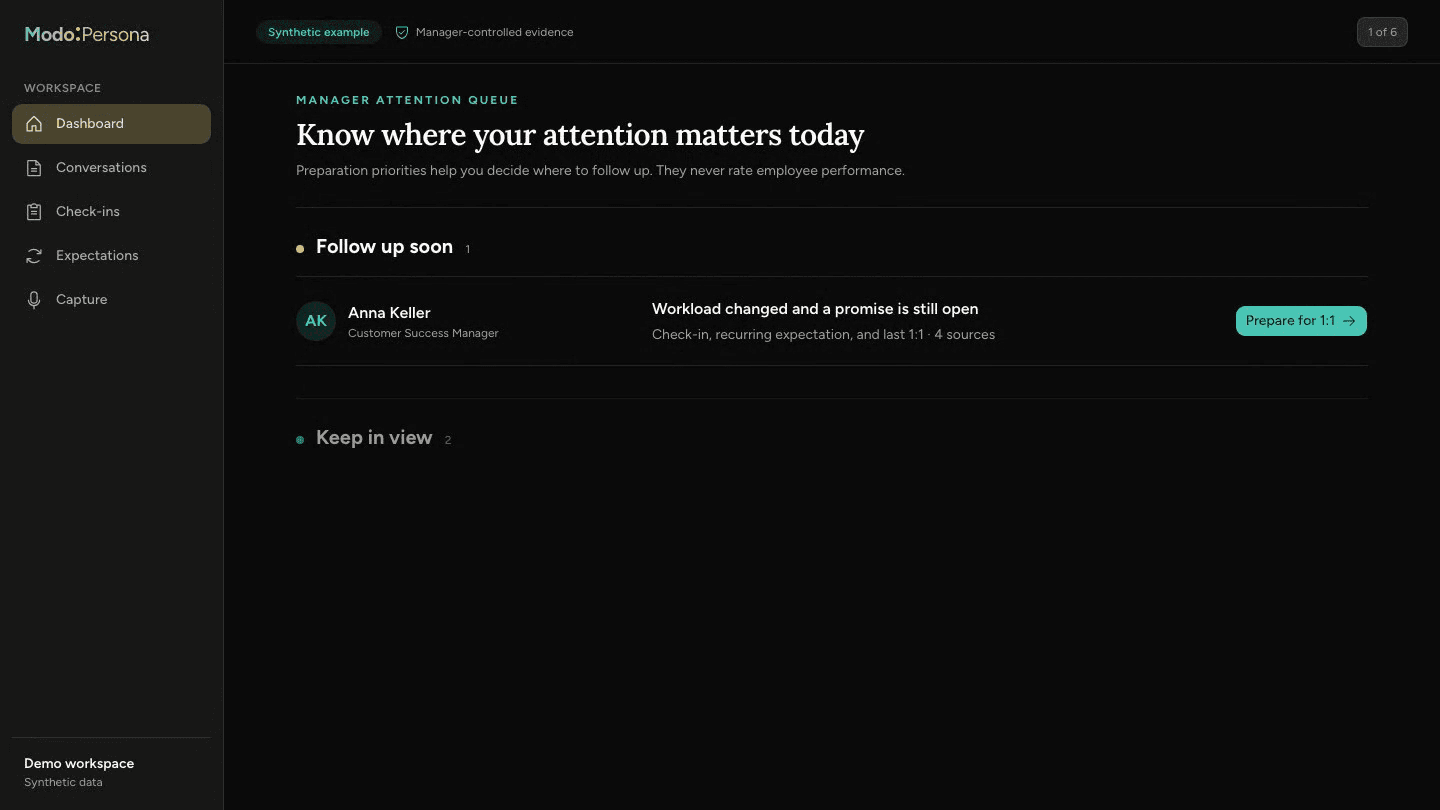
Read-only HubSpot context, never an employee score
ModoPersona does not write to HubSpot, rank or compare employees, infer why a customer record changed, or treat CRM activity as proof of productivity or performance. Connected records may support manager-defined recurring expectation checks, but every result remains source-backed context for manager confirmation, not an employment judgment or automatic people decision.
Questions managers ask
- Does ModoPersona change anything in HubSpot?
- No. The HubSpot connection is read-only. ModoPersona does not create or edit accounts, deals, activities, tasks, stages, notes, or next steps in the CRM.
- Can ModoPersona tell whether someone performed well from HubSpot?
- No. CRM records provide incomplete business context. ModoPersona does not calculate employee scores, infer effort or competence, compare people, or use pipeline activity to make performance or employment decisions.
Continue exploring ModoPersona
- Use casesBring a useful question to your next one-on-onePrepare one-on-ones from past agreements, recent notes, and your own promises. A worked example and a ten-minute preparation guide.
- Use casesTrack the promises you make as a managerKeep manager-owned promises visible with the person, source, and due date so they return before trust depends on remembering them.
- Use casesPrepare performance reviews without review-season archaeologyOrganize approved, dated evidence across the review period while keeping the final performance judgment with the manager.
Prepare for one better conversation
Start with one direct report, bring in the context you trust, and see what returns before the next one-on-one.
Start a 14-day trial